
What is Digital register in mygate?
A Digital Register is an online version of the physical registers that security guards traditionally maintain at society gates.
Instead of writing details manually on paper (like key movements, water tanker entries, etc.), guards can now record all such information digitally through the MyGate Guard App.
These entries are securely stored, easy to read, and instantly accessible to society admins for viewing, reporting, and audits — eliminating the need for paper-based record keeping and manual report compilation.
How does it work?
Open the Digital Register section on the guard app
Tap the three dots (⋮), and select Digital Registers.
Tap Create New Register, name it (like Key Register or Water Tanker), and add 2–8 custom fields.
Start adding entries — each record auto-captures date, time, and guard name.
👉 Click below to watch the video guide for guards.
How can an admin view Digital Register reports?
Admins have complete visibility and control over all digital registers from the MyGate admin dashboard. They can view every register — active or deleted — along with detailed entry information for audit and reporting. The dashboard also highlights any modifications through an “Edited” indicator, ensuring full transparency and easy tracking of changes.
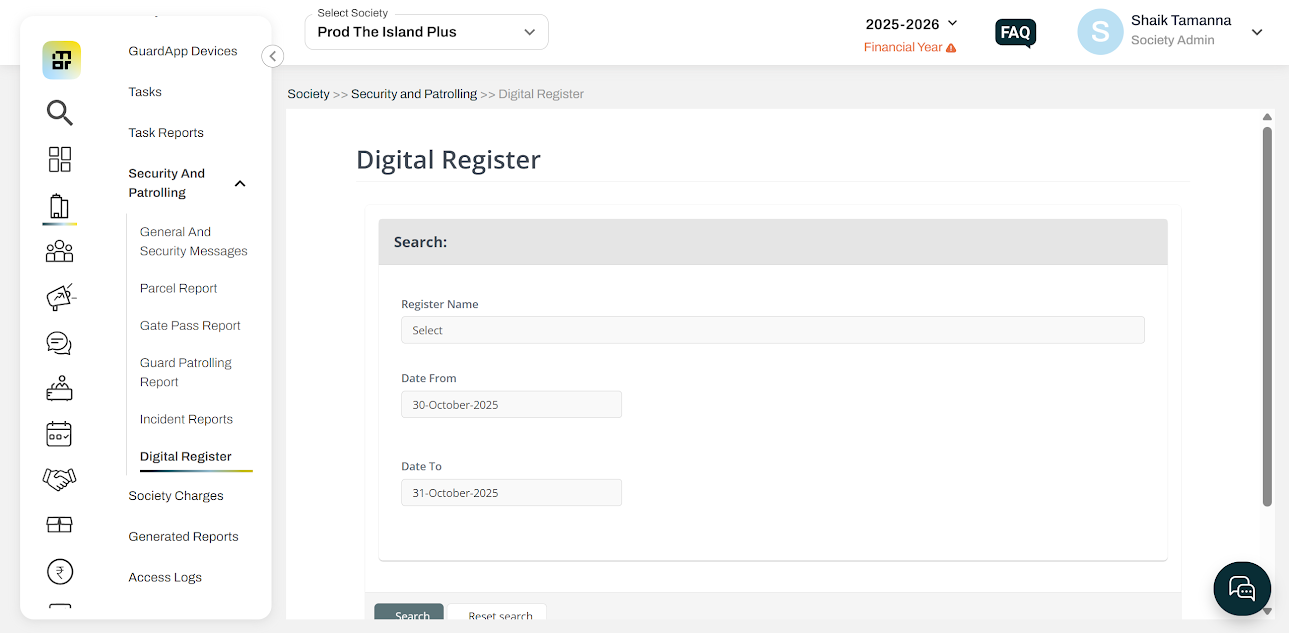
To view digital reports on the admin dashboard, follow these steps:
Log in to the MyGate Admin Dashboard.
Navigate to Society → Security and Patrolling → Digital Reports.
Note:
Entries can be edited once; both original and edited data remain visible to admins.
Deleted registers are tagged as “Deleted from Guard App” but stay viewable on the dashboard.
Offline entries sync automatically once the device reconnects.
The app shows suggestions for frequent entries to speed up data filling.