
Ledger/Account Archival
1. How do I archive a ledger?
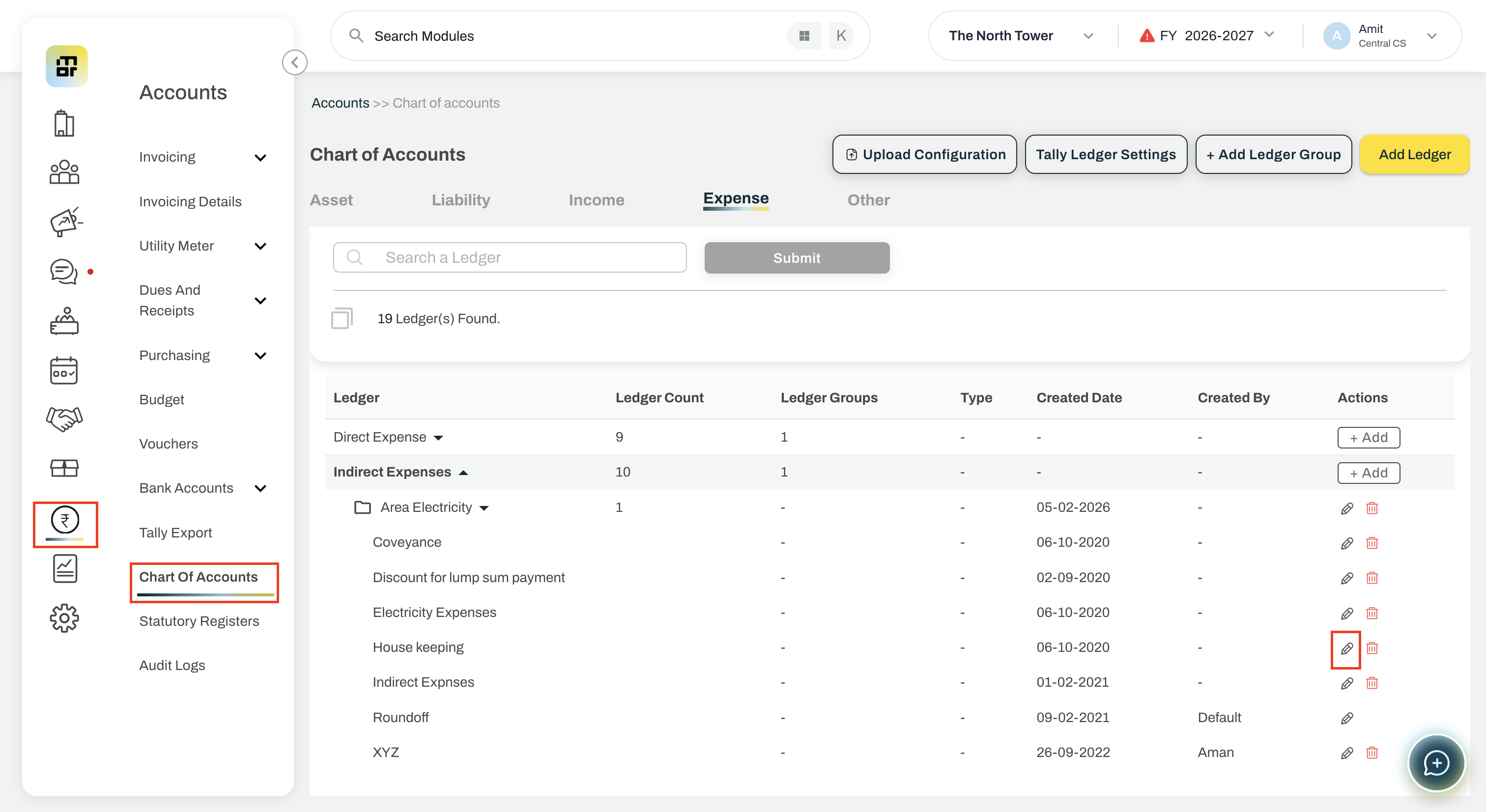
Go to Accounts >> Chart of Accounts
Find the ledger you want to archive.
Click on Edit button
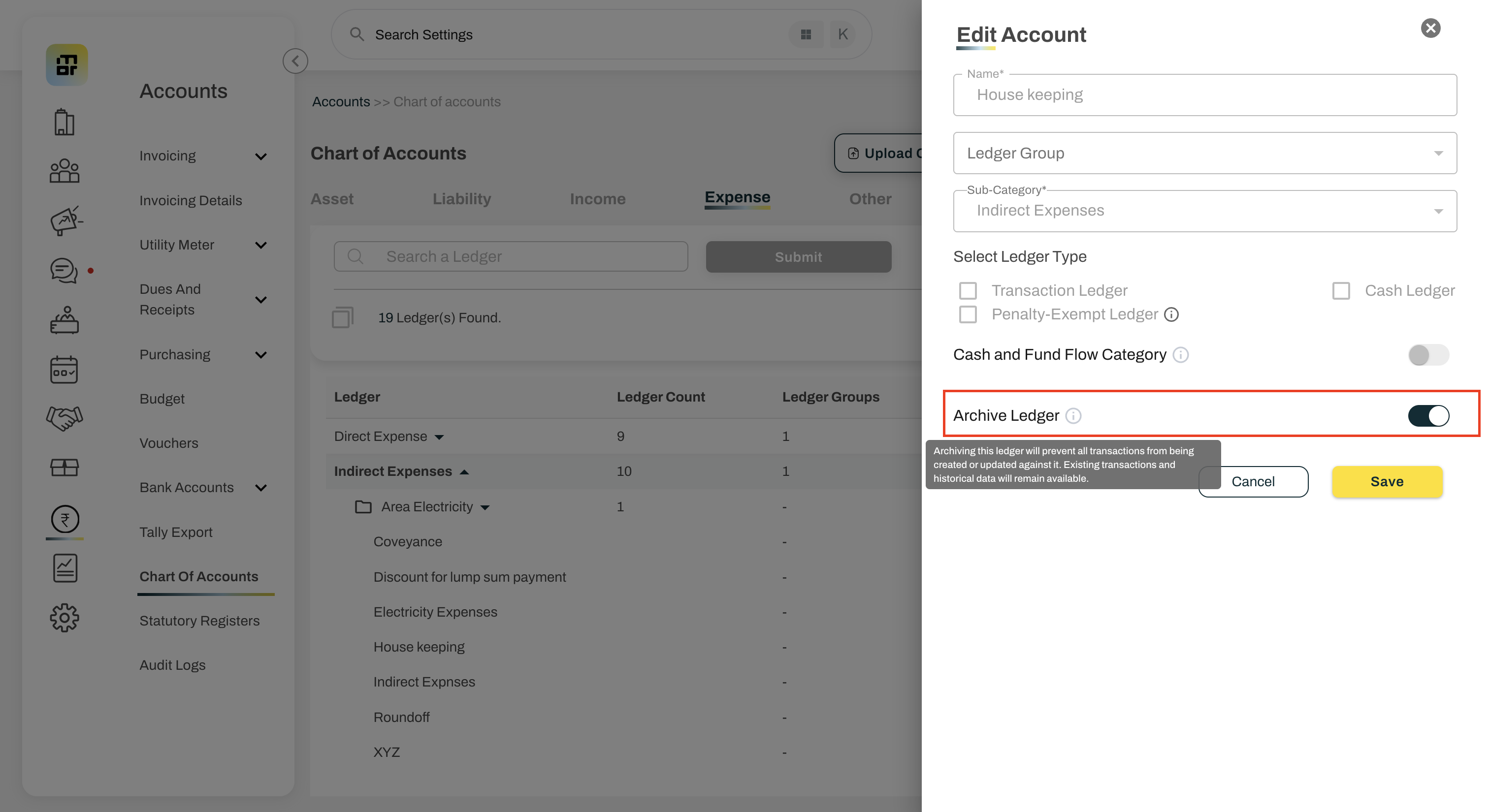
Use Archive toggle button
Click Save to archive the ledger.
The system will first check whether the ledger meets the archival criteria and has no active dependencies.
2. What is Ledger Archival?
Ledger Archival allows societies to stop using ledgers that are no longer required, while keeping all their historical accounting data intact.
3. Why would I archive a ledger?
You can archive a ledger if it is no longer required, was created for one-time use, has been replaced by another ledger, or if you prefer to create a new ledger for each financial year.
4. Which ledgers can be archived?
All user-created ledgers can be archived irrespective of their balance.
5. Can I archive a ledger that has existing transactions?
Yes. Existing transactions do not prevent archival, subject to the ledger eligibility and dependency checks.
6. What happens after I archive a ledger?
The ledger cannot be used for creating new transactions or entries. It will also not be available for new configurations or transaction uploads.
7. Will archiving delete my previous transactions?
No. All existing transactions and historical accounting data will remain unchanged.
8. Can I view archived ledgers in reports?
Yes. Archived ledgers will continue to be available wherever historical data is required, including ledger statements, financial reports, audit logs and downloads.
9. Will an archived ledger appear in current-year reports?
If the ledger has transactions in the current financial year, it will continue to appear in current-year reports. From the next financial year onwards, it will not appear in active reports if the balance is zero.
10. Can I select an archived ledger while creating a transaction?
No. Archived ledgers cannot be selected for new transactions such as JV, Vendor Bill, Invoice, Receipt, Payment, Debit Note, Credit Note and other applicable transactions.
11. Can I upload transactions against an archived ledger?
No. Archived ledgers cannot be used through transaction upload or bulk-upload flows.
12. Can I make changes to an archived ledger in the Chart of Accounts?
No. Ledger configuration cannot be changed while the ledger is archived.
13. Can I archive a ledger that is being used in another configuration?
No. A ledger cannot be archived if it is currently used in a Penalty Setting, Running FD, Invoice Template, Mapping Account or Amenity invoicing. The dependency must be removed before archival.
14. Can I use an archived ledger in a new configuration?
No. Archived ledgers will not be available for new configurations or mappings.
15. Can I delete an Archive ledger?
No. An Archived ledger cannot be deleted. To delete the ledger, you must first Unarchive it.
16. How do I unarchive a ledger?
Go to Accounts >> Chart of Accounts, select the required ledger and click on Edit button and Unarchive.
17. What happens after I unarchive a ledger?
The ledger becomes available for new transactions and applicable configurations again. Its historical data and existing configuration remain unchanged.
18. Who can Archive or Unarchive a ledger?
Only users with permission to manage/edit the Chart of Accounts, such as Admin and Treasurer, can Archive or Unarchive a ledger.
19. Will the Archive/Unarchive action be recorded?
Yes. The Audit Log will record the ledger name, action, user, and date and time.
20. How will I identify an archived ledger?
Archived ledgers will be clearly marked as Archived in the Chart of Accounts.
21. What happens if I try to edit a transaction where the archived ledger is tagged ?
You will get an error, “This ledger has been archived and cannot be used for new transactions. Please select an active ledger.”